Keyboard / Mouse
External USB input device
Hardware-level input customization
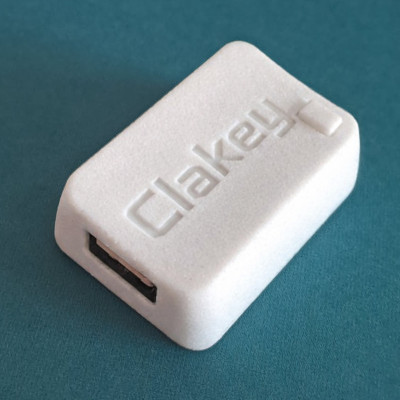
Clakey is a small USB device that sits between your keyboard or mouse and your computer. It adds action remaps, shortcuts, macros, and custom behavior that stay consistent across machines and operating systems.
Clakey hardware
Keyboard / Mouse
External USB input device
Clakey
Inline input layer
Computer
Any USB host and OS
See it in motion
A temporary layout can bring navigation closer without changing the rest of your keyboard.
What gets easier with Clakey
It helps you bring common actions closer, reduce repeated steps, and keep your setup more consistent across machines and operating systems.
Move actions closer to where they feel natural.
Trigger repeatable routines with a single input.
Reduce extra movement in repetitive workflows.
Keep more of your input habits when you switch systems.
How it works
Clakey sits between your input device and your computer, so the behavior you configure travels with the setup itself.
Plug Clakey between your USB keyboard or mouse and your computer.
Create remaps, shortcuts, repeated actions, and other behavior in the configurator.
Take a more consistent input layer with you across devices and operating systems.
Windows, macOS, Linux, and web configurator
FAQ
Clakey is a small USB device that sits between your keyboard or mouse and your computer, adding remaps, repeated actions, shortcuts, and other custom input behavior.
It is for people who already notice the small frictions in their setup — repeated tasks, awkward shortcuts, too much hand travel, or behavior that falls apart across machines.
Clakey is a hardware solution that, once configured, can work across different USB host devices and operating systems.
Software is only needed to configure Clakey. Once configured, it can be used without installing the same utility on every machine. Configuration can be done through the Windows, macOS, Linux, or web app.
No. Clakey works with USB input devices. It is designed for external keyboards and mice connected over USB, not for built-in laptop keyboards or direct Bluetooth devices.
Not yet. Clakey is currently in beta and is not available for general purchase.
Early access and updates
Choose the path that fits you best: apply for beta access or join the waitlist for launch updates.
If you’d like to follow Clakey as it gets closer to launch, you can join the waitlist for updates and future availability.
Join the waitlistIf you already have a concrete use case and want to try Clakey early, you can apply for beta access. It’s for people willing to use it in a real setup and share honest, practical feedback.
Apply for beta